

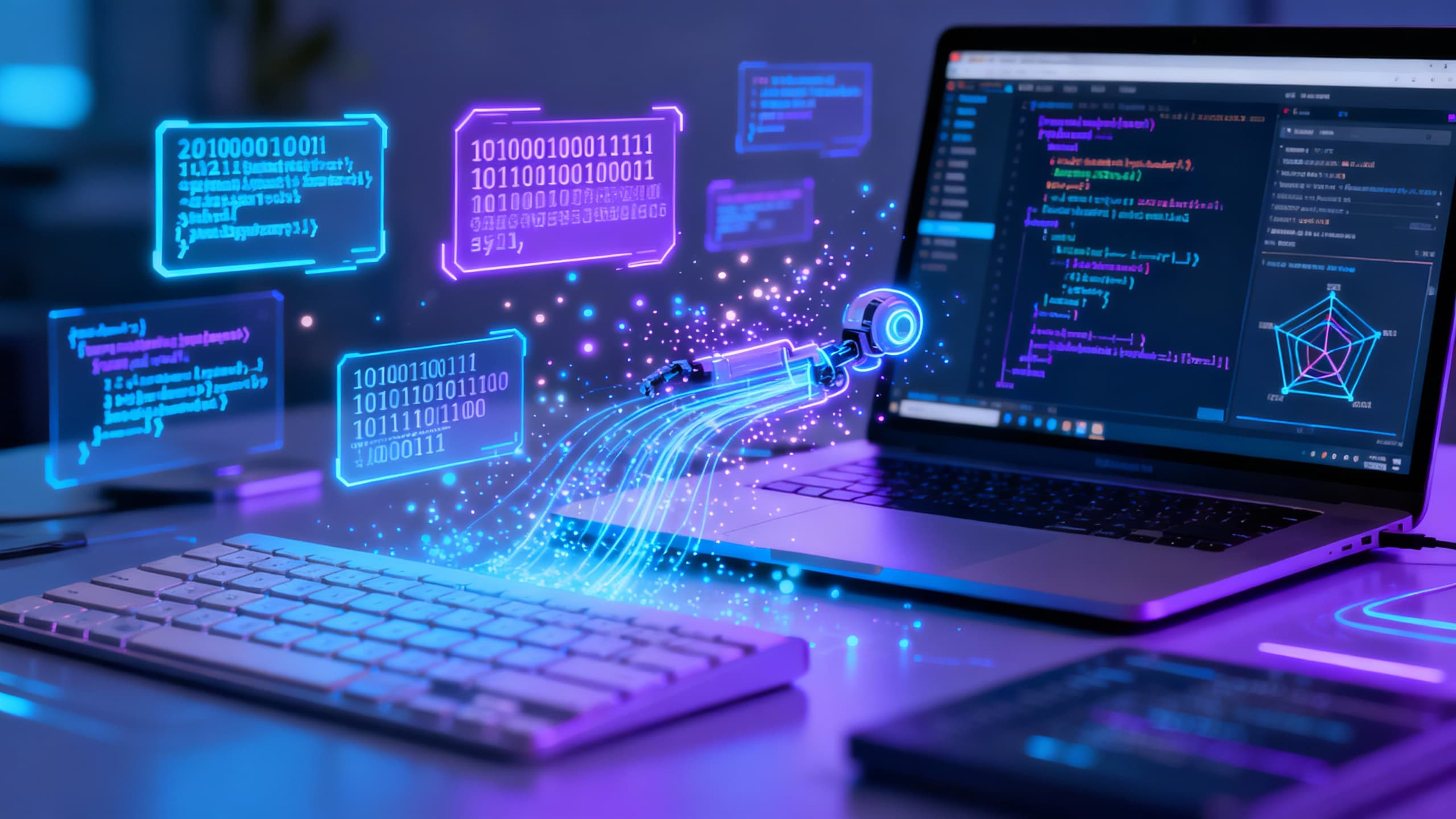
AI-powered coding assistants like GitHub Copilot, Amazon CodeWhisperer, and OpenAI's ChatGPT have rapidly moved from novelty to everyday development tools. By late 2025, surveys indicated over 80% of programmers were using some form of AI help in coding.
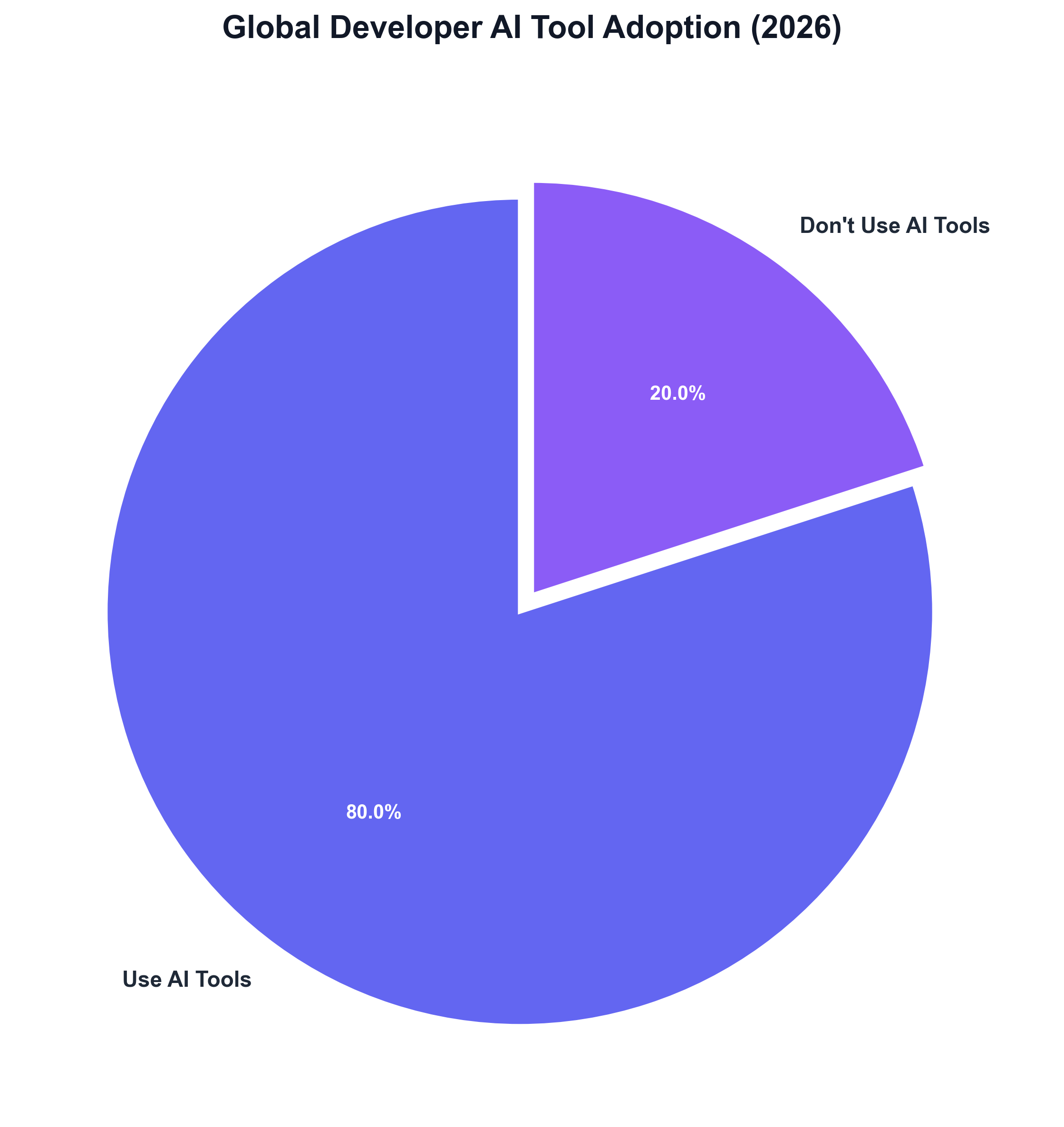
These tools promise to boost productivity – early GitHub studies found developers completing tasks "55 percent faster" with Copilot's aid – and they are now integrated into IDEs and workflows for tasks like scaffolding projects, generating boilerplate, and exploring unfamiliar APIs.
However, alongside that enthusiastic adoption, a growing chorus of developers is voicing frustration with the quality of AI-generated code. Recent forum discussions, blog posts, and even empirical research reveal that the "AI pair programmer" can introduce as many headaches as it resolves.
From Hype to Headaches: Mounting Developer Complaints
In community forums and social media, software engineers have been sharing strikingly similar stories of AI assistants going awry. On GitHub's own support forums, one developer lamented that Copilot suddenly became "a frantic, destructive and dangerous actor, over eager to please, jumping to immediate (and plainly incorrect) conclusions… generating hideously complex (and often unworkable) coding strategies". Another replied, "I loved the service until recently, but now it cannot be trusted unfortunately."
Such anecdotes are increasingly common. A popular post on Dev.to described the experience of being misled by AI-generated code: "Copilot confidently suggests a chunk of code that looks perfect until it absolutely detonates your build… you just got gaslit by an autocomplete." On Reddit and Hacker News, threads read like group therapy sessions for frustrated users, trading tales from "It finished my CRUD in seconds" to "It hallucinated an entire API, and I merged it anyway."
Even seasoned developers are growing wary. One Hacker News commenter quipped, "Copilot saves me 30 minutes writing code and costs me 2 hours debugging it." This jarring trade-off – speedy output followed by lengthy clean-up – encapsulates a broader sentiment that the initial "magic" of AI assistance has given way to disillusionment.
In an internal study by GitClear, the surge of AI-generated contributions was likened to an itinerant junior developer flooding codebases with issues: "using Copilot is strongly correlated with 'mistake code' being pushed to the repo." In short, many professionals are finding that these tools, while powerful, must be treated with caution. As one aggregated analysis of thousands of Copilot opinions concluded, "Copilot lies or produces bad results for a vast majority of the time," and its unreliability has led some users to abandon it despite the productivity boost.
Common Issues: Hallucinations, Boilerplate, and Bugs
Digging into the complaints, several recurring problems emerge. Developers report that AI coding assistants frequently suffer from the following issues:
Hallucinated Code and APIs
Generative models sometimes suggest functions, classes, or entire APIs that don't exist in the project or any library. The code looks plausible – even well-structured – but is essentially fabricated. Users have joked about Copilot "hallucinating an entire API" that they unwittingly incorporated. This can lead to confusion and broken builds when the non-existent references inevitably fail.
Outdated or Incorrect Suggestions
Another frustration is AI recommendations that are syntactically correct but obsolete or inapplicable. Developers note that Copilot will confidently import deprecated libraries or use outdated patterns. One developer admits he "conveniently skipped" mentioning in a stand-up that Copilot "imported the wrong version of Axios and wrote a promise chain straight out of 2015." These tools are trained on billions of lines of code, including legacy and bad examples, so they sometimes guide users down antiquated paths.
Excessive Boilerplate and Duplication
Far from promoting elegant code, AI assistance can encourage verbosity. Studies of AI-influenced codebases have found a rise in "copy-paste" coding. GitClear's analysis showed code churn (rapid edits and reverts of new code) doubled after Copilot's introduction, and the proportion of copy-pasted lines increased markedly.
Instead of refactoring, developers face one-keystroke temptation to duplicate logic. "AI-generated code resembles an itinerant contributor, prone to violate the DRY principle," the GitClear whitepaper observed. The result is bloated code that may work initially but creates "future headaches" for maintenance.
Subtle but Serious Bugs
Perhaps the most insidious issue is AI's tendency to introduce errors that are small in appearance but large in impact. Because the suggestions often look "clean" and coherent, a developer might accept them quickly – only to later uncover a logical flaw.
For example, an engineering manager recounted how Copilot wrote a routine that saved him "25 minutes of writing," but a tiny mistake (a misoriented > operator) lurked within, causing a bug that took "two to three hours" to diagnose.
In a more dramatic incident, a medium-sized tech company accidentally wiped 47,000 user records after deploying a Copilot-recommended code change that passed code review and tests – only to trigger a massive data loss in production. The mishap cost the company an estimated $47k in recovery efforts and led the team to pen an unsettling post-mortem about trusting AI-generated logic.
Security Vulnerabilities
Quality concerns go beyond correctness and maintainability – there are security implications as well. Researchers have found that a significant fraction of AI-generated code contains known vulnerability patterns. One 2025 study found 30–50% of sampled Copilot outputs contained critical security flaws, from SQL injection holes to the use of insecure cryptographic functions.
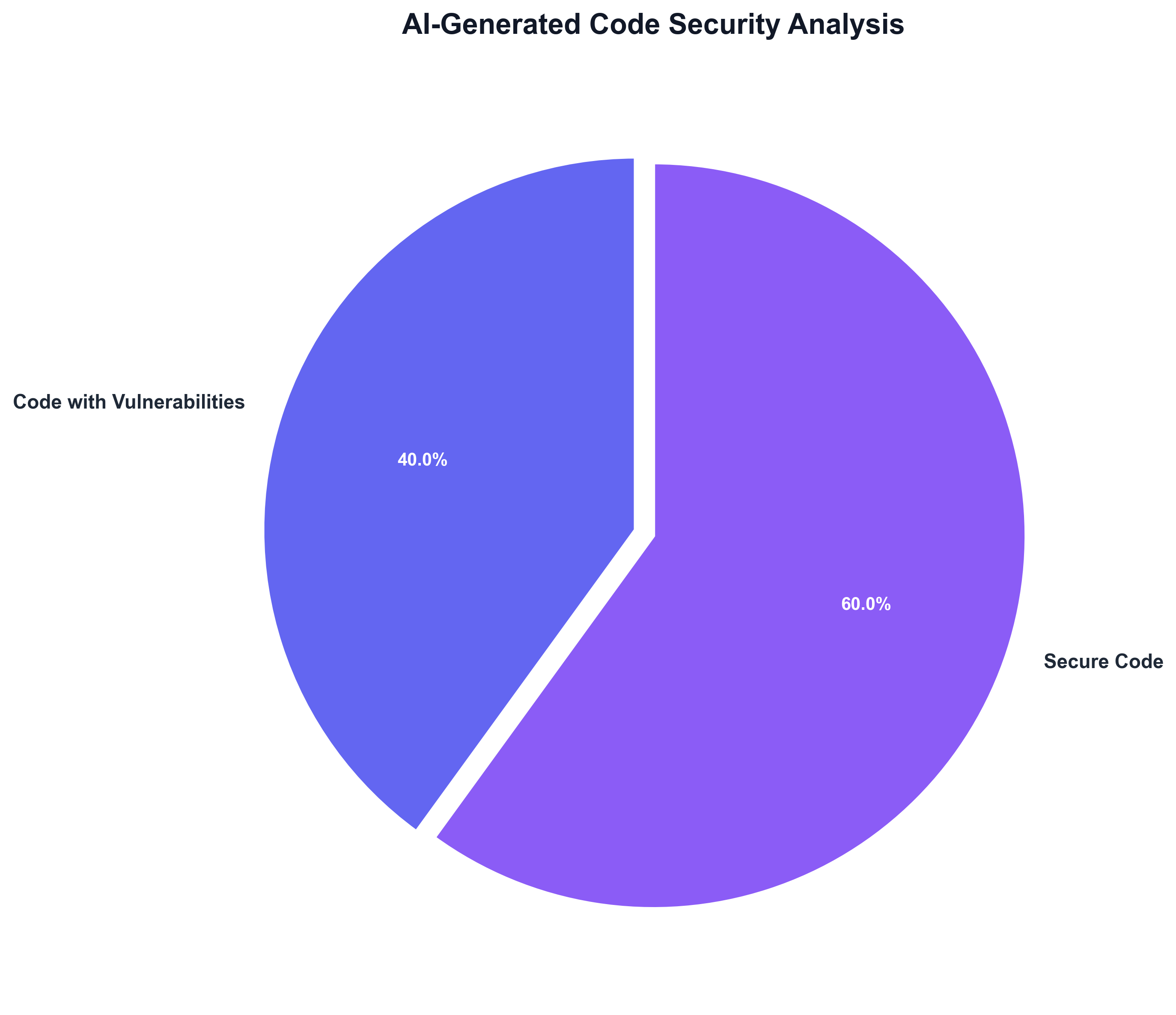
In many cases the AI would even hallucinate authentication or encryption logic that looked convincing but failed to enforce real security. Such issues can slip past human reviewers if the code "appears" fine, only to emerge as liabilities later.
The Core Problem: Syntax vs. Semantics
In sum, while AI assistants seldom write invalid code, they often produce unreliable code – the kind that works at first glance but harbors hidden problems. As one analysis put it bluntly: these models "understand syntax but not semantics," meaning they can craft superficially correct solutions that lack true understanding of what the program should do.
Edge cases, proper error handling, performance considerations, security checks – all can be missed by the generative algorithm, requiring engineers to remain extremely vigilant.
Perspectives from the Developer Community
Reactions to these quality issues vary across the software industry. Many rank-and-file developers have become openly skeptical.
"Copilot creates more problems than solutions," reads one representative comment, "often wasting time or flat out breaking your code." The sentiment that "Copilot can waste your time" by introducing bugs that "take more time to debug and fix than writing the code yourself" is echoed across multiple forums.
Some have even likened using AI assistants to managing an unruly junior programmer – one who can accelerate initial drafts but requires constant oversight. "Just like managing a junior developer, Copilot requires a lot of oversight," the same analysis noted, warning that for some users the tool "ultimately doesn't save them any time."
The Optimistic View
On the other hand, there are still many proponents and optimistic observers of these tools. Some developers say they continue to find Copilot, ChatGPT, and similar assistants "very, very powerful" as long as one "treats it with a level of distrust."
In practice, teams are learning to use the AI for what it does well (speeding up boilerplate, suggesting readable code) while double-checking its work. "Engineers just started using it because it made their lives significantly easier," said one engineering manager, "even though they have to treat it with a level of distrust."
This guarded embrace reflects the view that AI coding assistants are neither magic wands nor existential threats, but new tools that must prove themselves. "It's a tool. It doesn't make sense to blame the tool," one developer argued on Hacker News, noting that Copilot "can handle the boilerplate, the mundane, and free up the human element to focus on the heavy lifting". But even that commenter conceded "it's early days… it seems unlikely it's going to go away" – implying that patience and further iteration will be needed to address the shortcomings.
The Perception Gap
Notably, some tech leaders and companies remain bullish on AI coding despite the noise. A Bain & Company survey of software executives in 2023 found 57% of CTOs and engineering leads were already rolling out AI pair-programming tools, citing faster development and improved code quality as key benefits.
And GitHub's own global surveys report that nearly 90% of developers who use AI assistants believe it has improved code quality in their projects.
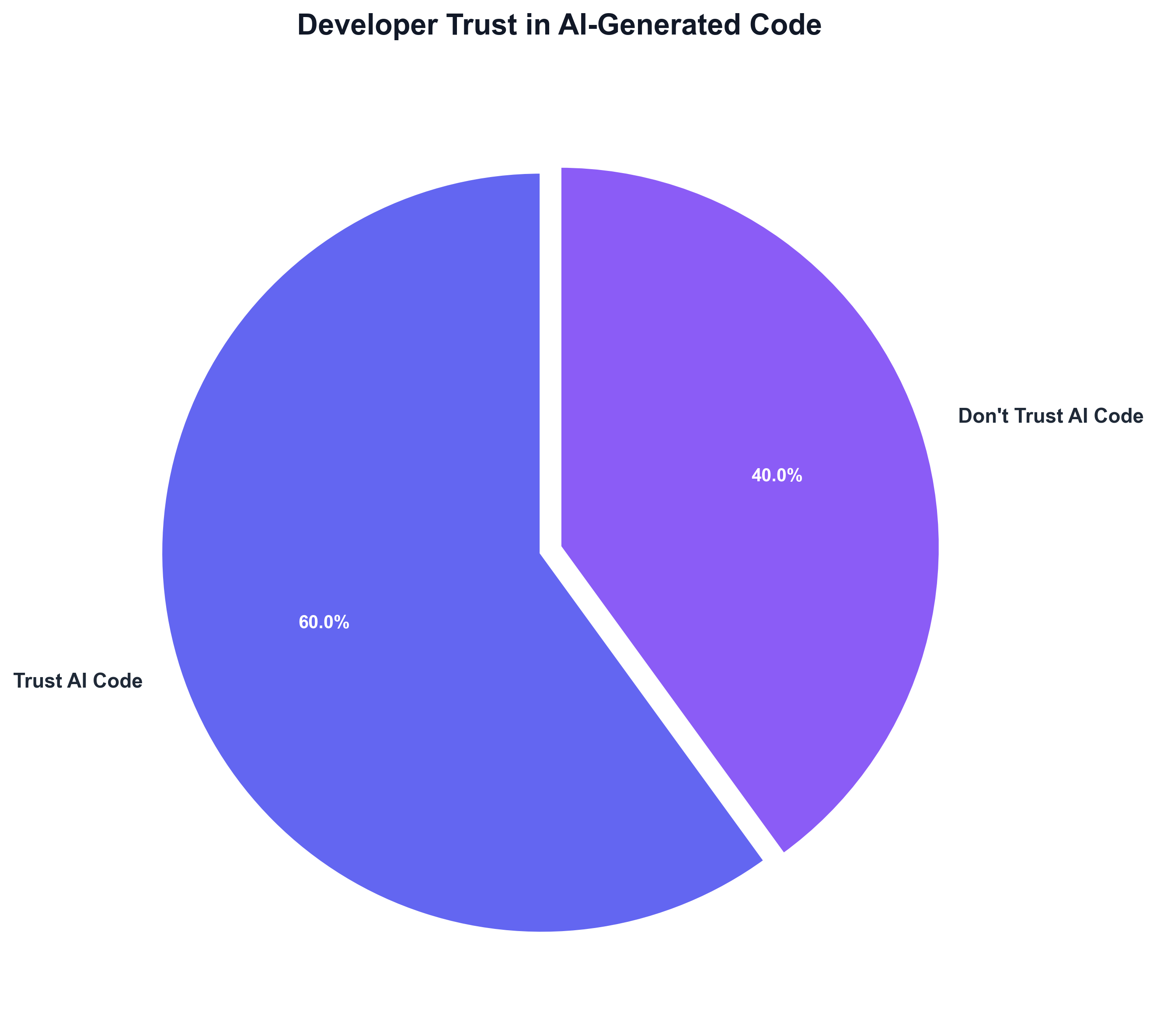
This highlights a potential perception gap. The definition of "quality" may differ – for management, the ability to ship features quickly and reduce tedious coding can feel like a quality improvement, whereas practitioners define quality by robustness and clarity of code.
As one software engineer observed, rapid AI-generated output can create an "illusion of productivity" where "teams confuse output speed with value, overlooking the quality trade-offs buried beneath." In other words, AI can make it easier to produce more code – but more code is not always better code.
How AI Coding Tools Fit into Workflow Today
Despite the concerns, AI coding assistants have undeniably woven themselves into daily development work. GitHub Copilot, launched in 2021 and now with millions of users, is embedded in code editors to suggest code in real time as developers type.
It excels at handling repetitive snippets – for example, generating the boilerplate of a new class, unit test, or API call with just a comment or a function name as a prompt. Developers frequently use Copilot or OpenAI's ChatGPT to scaffold projects, quickly stub out functions, or get suggestions on how to use an unfamiliar framework.
ChatGPT (especially with GPT-4) is often used in a conversational manner – one can paste an error message or a tricky function and get an explanation or a step-by-step fix recommendation. It "produces detailed, clean, and production-ready code with robust error handling," according to one evaluation, and is also adept at answering questions about how to improve or refactor code.
Meanwhile, Amazon's CodeWhisperer (now rebranded as Q Developer), offered free to individual developers, is integrated into AWS tools and IDEs to auto-complete code, particularly optimizing for AWS APIs and workflows. CodeWhisperer even includes automated security scanning of its suggestions (to catch things like hard-coded credentials or injection flaws) – a feature that neither Copilot nor ChatGPT currently offer out of the box.
Common Use Cases
These AI helpers are becoming like another set of "eyes" or a tireless junior pair-programmer within the team. Common use cases include:
- Generating template code (so developers can focus on business logic)
- Suggesting edge-case unit tests
- Translating code between languages
- Summarizing or reviewing code for bugs
In code review, some teams use AI to analyze a pull request and highlight potential issues or to explain legacy code to newer team members. The net effect is that AI coding assistants can reduce drudgery – a developer can offload mundane coding tasks (adding getters and setters, writing repetitive SQL queries, etc.) to the AI and free up time for more complex design work.
"It frees up developers from mundane tasks and makes work more enjoyable," as one CTO said, while emphasizing that "human oversight remains essential for correcting the tool's occasional mishaps." In this way, many teams are finding a balance: using the AI to accelerate routine coding, but keeping a human in the loop to vet the output.
Toward Higher-Quality AI Assistance: What's Next
The current wave of developer discontent is not lost on those building the next generation of these tools. Both researchers and AI providers are actively looking to improve the reliability of coding assistants.
Smarter Models
One approach is to simply make the models smarter and more attuned to correctness. The latest large models are already a leap ahead – for instance, OpenAI's GPT-4 has been shown to solve significantly more coding challenges correctly (in one benchmark, ~65% success) than earlier Codex/Copilot models (~46%) or CodeWhisperer (~31%).
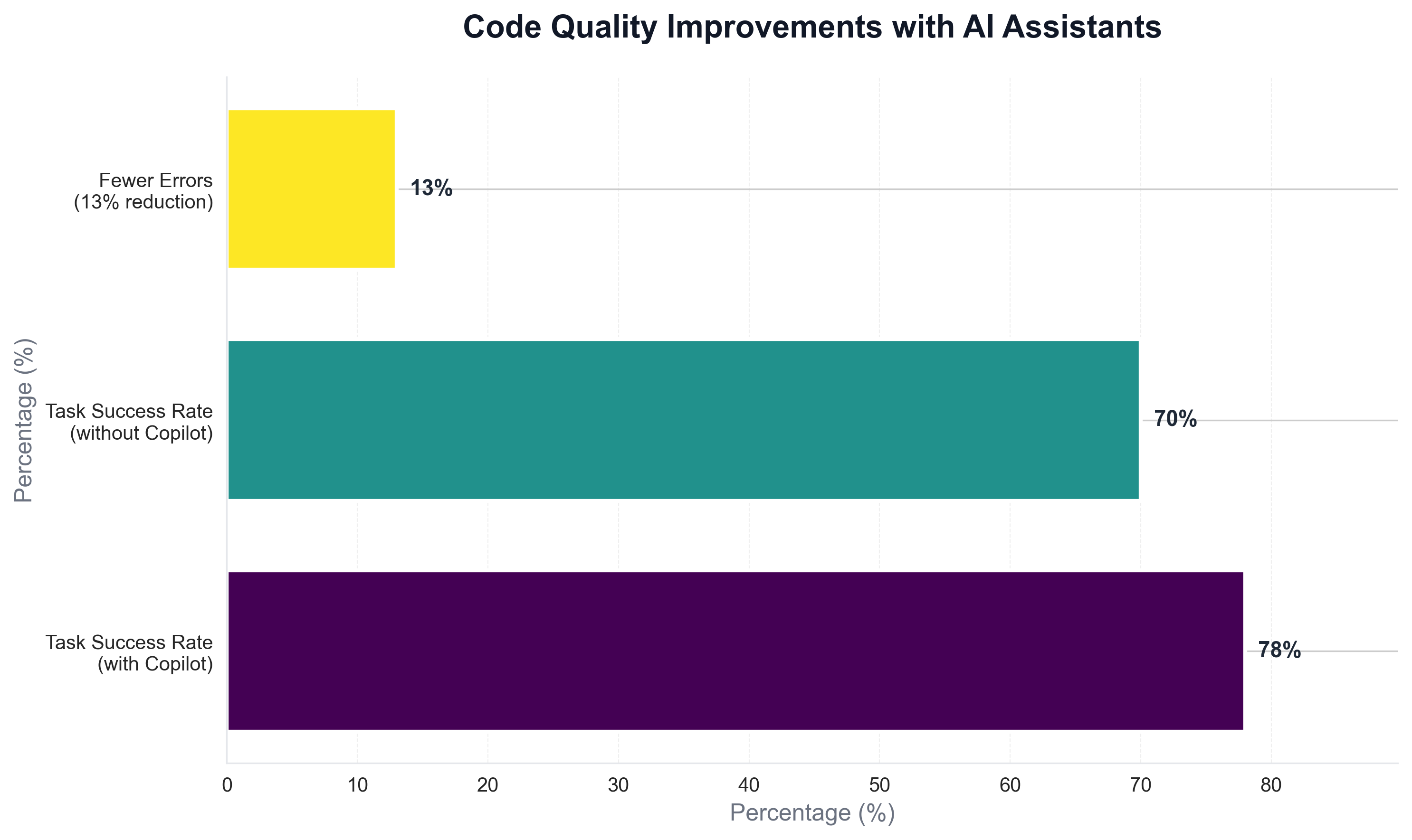
As companies like OpenAI, Google, and Meta refine their code-focused models (with Google's new Codey/Gemini and Meta's open-source Code Llama being notable entrants), we can expect a push toward fewer hallucinations and better understanding of code semantics.
These newer models also come with expanded context windows, meaning an AI could take into account an entire project's codebase or documentation to avoid the "out-of-context" mistakes current tools make. GitHub, for its part, began rolling out a GPT-4 powered version of Copilot (Copilot X) which not only suggests code but can also answer questions about your code and explain its suggestions – a move aimed at making the AI a more transparent collaborator rather than a mysterious code oracle.
Memory and Context Retention
Another focus area is memory and context retention. Today's AI assistants have short memories – they often forget earlier parts of the code or conversation, leading to inconsistent suggestions. This has been a sore point for developers using chat-based tools.
"Developers are frustrated by agents that forget everything between sessions," notes a RedMonk analyst, describing a growing demand for IDEs that can remember past interactions and project history.
In response, new "agentic" IDE prototypes are emerging that keep persistent context and even run continuous analyses in the background. For example, some experimental tools now let you spawn background AI agents that monitor your entire codebase for issues or handle multi-step refactoring tasks autonomously. If these agentic assistants mature, they could catch many AI-introduced errors by cross-checking changes across files and running tests automatically – essentially acting as a real-time pair reviewer to the AI's pair programmer.
Process and Culture Changes
Beyond smarter models, process and culture changes are on the horizon to address AI quality. Many organizations, having been burned by AI-generated bugs, are instituting fail-safes.
It's becoming common to treat any AI-written code as "untrusted by default," requiring extra scrutiny before merging. In practical terms, that means AI suggestions must pass through additional static analysis, security scanning, or dedicated code review, just as a human junior developer's code might.
Microsoft researchers recently found that developers reviewing AI-generated code missed more bugs than those reviewing human code, precisely because AI output looked so polished. To counteract this, teams are training themselves not to be lulled by the apparent neatness of AI code – effectively, to "trust but verify" every suggestion.
Some tools are adding features to assist with this verification: for instance, competitor extensions have begun offering self-review modes where the AI explains the diff of its changes or cites sources for its code snippets. Such features could help developers spot hallucinations or poor logic before they slip in.
AI as Assistant, Not Replacement
Finally, there is a growing recognition that AI coding assistants work best as assistants, not replacements. Thought leaders advise using these tools to augment human developers rather than to automate them away.
The most effective use cases so far are those that shift AI into a supporting role – for example, using AI to generate unit tests, documentation, or starter templates, which can then be rigorously checked by engineers. By offloading the grunt work to AI and keeping core design and review tasks in human hands, teams can get the best of both worlds.
"The real promise of AI isn't just about writing more code – it's about writing better code," one software commentator noted, "Achieving that will require a culture shift that embraces these tools without outsourcing our engineering discipline."
In the near future, we can expect AI tools to integrate more tightly with software engineering best practices – from built-in security checks (following CodeWhisperer's lead) to AI-on-AI auditing where one model double-checks another's output.
Conclusion
Neutral observers say the current frustration is a necessary phase in the evolution of AI-assisted development. Much like the early days of any new technology, the hype is being tempered by hard lessons in real-world use.
Developers and AI creators alike are now grappling with how to rein in the errors without losing the efficiency. As the tools improve and practices adapt, engineering teams are aiming to turn these AI coding assistants from unpredictable copilots into truly reliable partners.
In the meantime, the prudent approach – as many have learned – is to enjoy the productivity boost, but keep your hands on the wheel. The AI may help write the code, but developers are still on the hook to clean up the mess afterward.