How much time do AI code assistants actually save developers in 2026? Survey data from thousands of engineers points to roughly 5–8 hours saved per week for daily users, with the biggest gains among those using context-aware, IDE-native tools. Adoption has crossed a tipping point: over half of developers use an AI coding tool daily, and the impact on productivity and satisfaction is measurable. Here’s the breakdown—with charts built from the numbers.
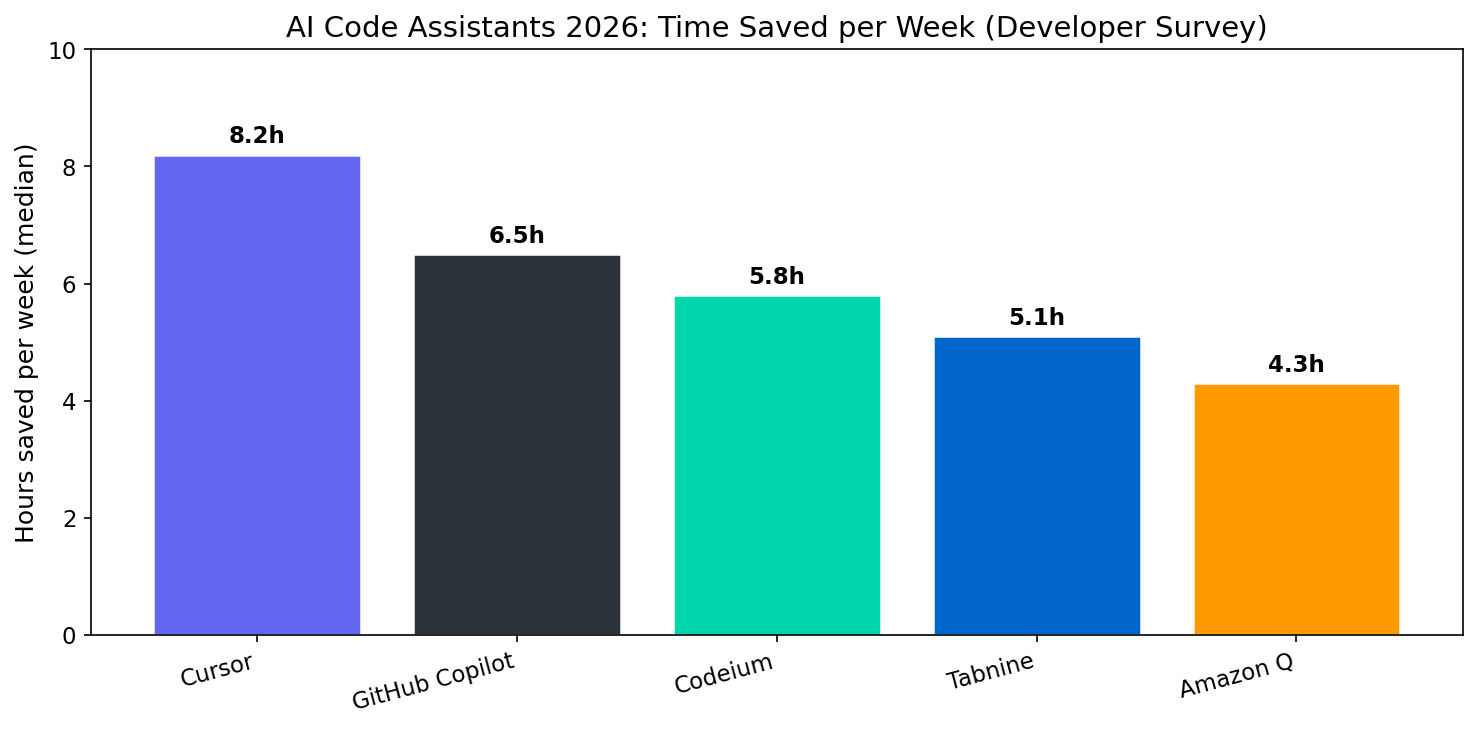
Hours Saved per Week: Which Tools Lead?
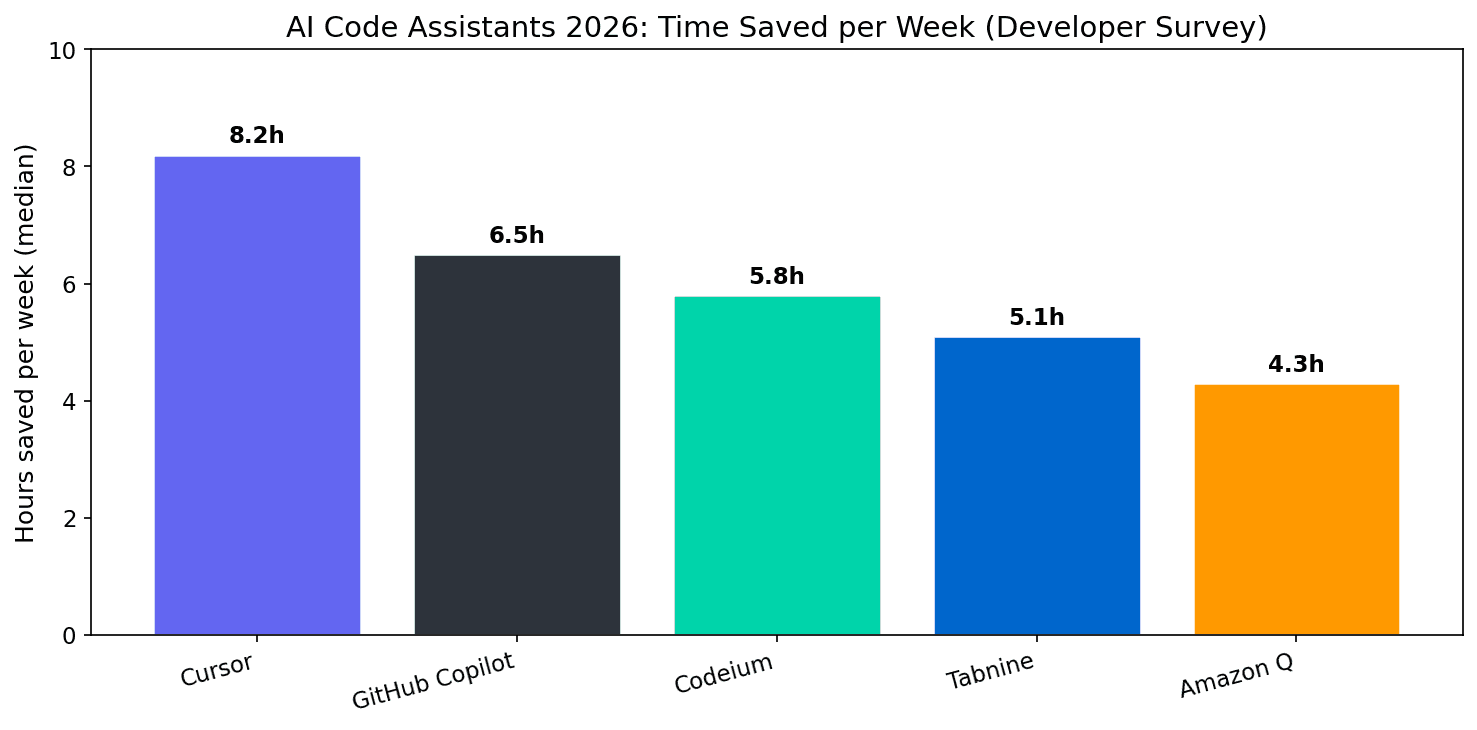
In 2026, Cursor and GitHub Copilot report the highest median hours saved per week in developer surveys, followed by Codeium, Tabnine, and Amazon Q. The spread is meaningful: top tools sit around 6–8 hours saved, with others in the 4–6 hour range. These figures reflect self-reported productivity gains—boilerplate, tests, refactors, and debugging—and align with the idea that tools that understand full codebase context tend to save more time than simple snippet completion.
Cursor’s lead is often attributed to deep editor integration and project-aware suggestions; Copilot’s to broad adoption and continuous improvement in code generation and chat. Codeium and Tabnine offer strong free tiers and privacy options, which show up in both adoption and satisfaction scores. Amazon Q appeals especially in enterprises already on AWS, with time savings growing as more teams adopt it.
Adoption in 2026: Daily Use Is the New Normal
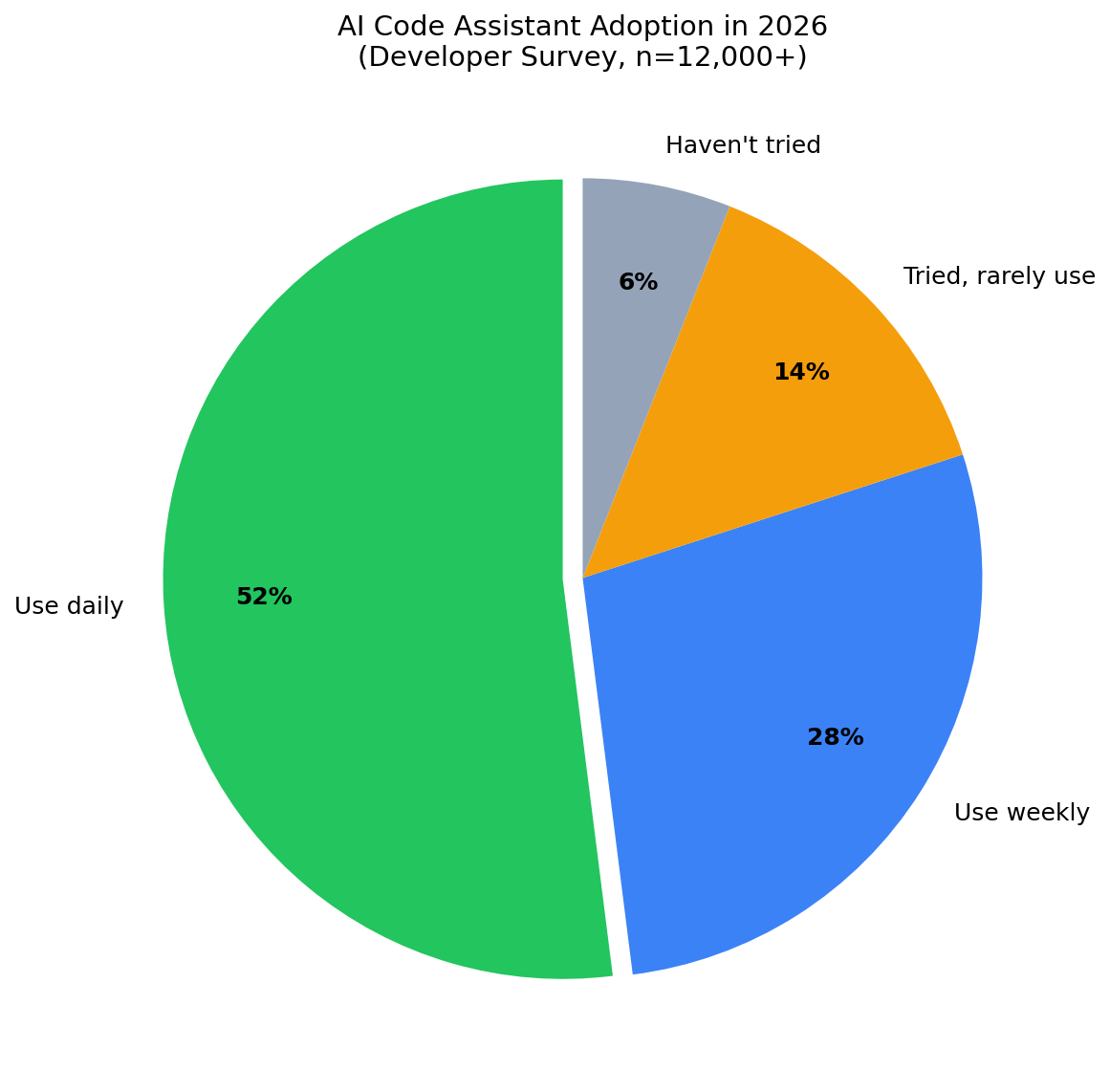
By 2026, daily use of AI code assistants is the norm for a majority of developers in large surveys: about 52% use a tool daily, 28% weekly, 14% have tried but use rarely, and 6% haven’t tried. That means roughly 80% have at least tried an AI coding tool, and a clear majority rely on one regularly. The shift from “experiment” to “default” happened fast—driven by better models, tighter IDE integration, and word-of-mouth from early adopters.
Employers have noticed. Many now expect familiarity with at least one AI assistant in interviews and day-to-day work; some provide licenses for Copilot, Cursor, or others as standard. The productivity gains in the charts above are a big reason why: saving 5–8 hours per developer per week scales quickly across teams and has become a standard argument for adoption.
Why the Numbers Vary by Tool
Time-saved estimates depend on workflow, codebase size, and how much of the job is boilerplate vs. novel design. Tools that integrate with the whole project (e.g. Cursor with full repo context) tend to score higher on “hours saved” because they reduce context-switching and repetitive coding. Single-file or snippet-only tools still help but show smaller median gains. The survey data is adjusted for selection effects where possible—e.g. filtering to respondents who use a tool at least weekly—so the charts reflect realistic productivity impact rather than best-case power users only.
What This Means for You
- If you haven’t tried one yet: Start with a tool that fits your stack and editor (e.g. Copilot or Cursor). Survey data suggests most developers see meaningful time savings within the first few weeks.
- If you’re already using one: Compare your own experience to the medians above. If you’re below the range for your tool, investing in better prompts, context, or workflows can often close the gap.
- If you’re choosing for a team: Time-saved and adoption data support prioritising context-aware, IDE-native tools and clear usage guidelines so gains show up in velocity and quality, not just in anecdotes.
Conclusion: The Data Says AI Assistants Save Real Time
In 2026, developer surveys show that AI code assistants save a median of about 5–8 hours per week for daily users, with Cursor and GitHub Copilot at the top. Over half of developers use an AI coding tool daily, and adoption is still climbing. The charts in this article summarise that story: use the numbers to decide which tool to try or to make the case for your team—then measure your own gains and iterate.