
Visual Studio Code is the default code editor for most developers in 2026. According to Stack Overflow's 2025 Developer Survey (over 49,000 respondents from 177 countries), Visual Studio Code and Visual Studio remain the top IDEs used by developers, with growing usage of AI-enabled IDEs including Cursor. Industry analyses such as Moldstud's Top 10 IDEs 2025 report VS Code at roughly 72% of the code editor market and over 14 million active monthly users, cited as the leading choice due to its lightweight architecture, extensive extension marketplace, and integrated terminal. The Python extension for VS Code alone has over 201 million installs, making Python the language with the single most popular extension—and Python is also the tool many teams use to visualize IDE adoption and extension trends. This article examines why VS Code dominates in 2026, how Python fits the workflow, and how Python powers the charts that tell the story.
72% Market Share: How VS Code Became the Default
VS Code's lead did not happen overnight. Stack Overflow's 2025 Developer Survey and press coverage confirm that Visual Studio Code and Visual Studio rank as the top IDEs, with usage growing for new AI-enabled IDEs added in 2025, including Cursor. Moldstud's comprehensive guide places VS Code at approximately 72% market share and 14+ million active monthly users, driven by free availability, cross-platform support, and deep integration with Git, debugging, and extensions. The JetBrains State of Developer Ecosystem 2025 (24,534 developers across 194 countries) provides additional context on IDE preferences by language and region. The following chart, generated with Python and matplotlib using Stack Overflow and market-style data, illustrates IDE adoption in 2025–2026.
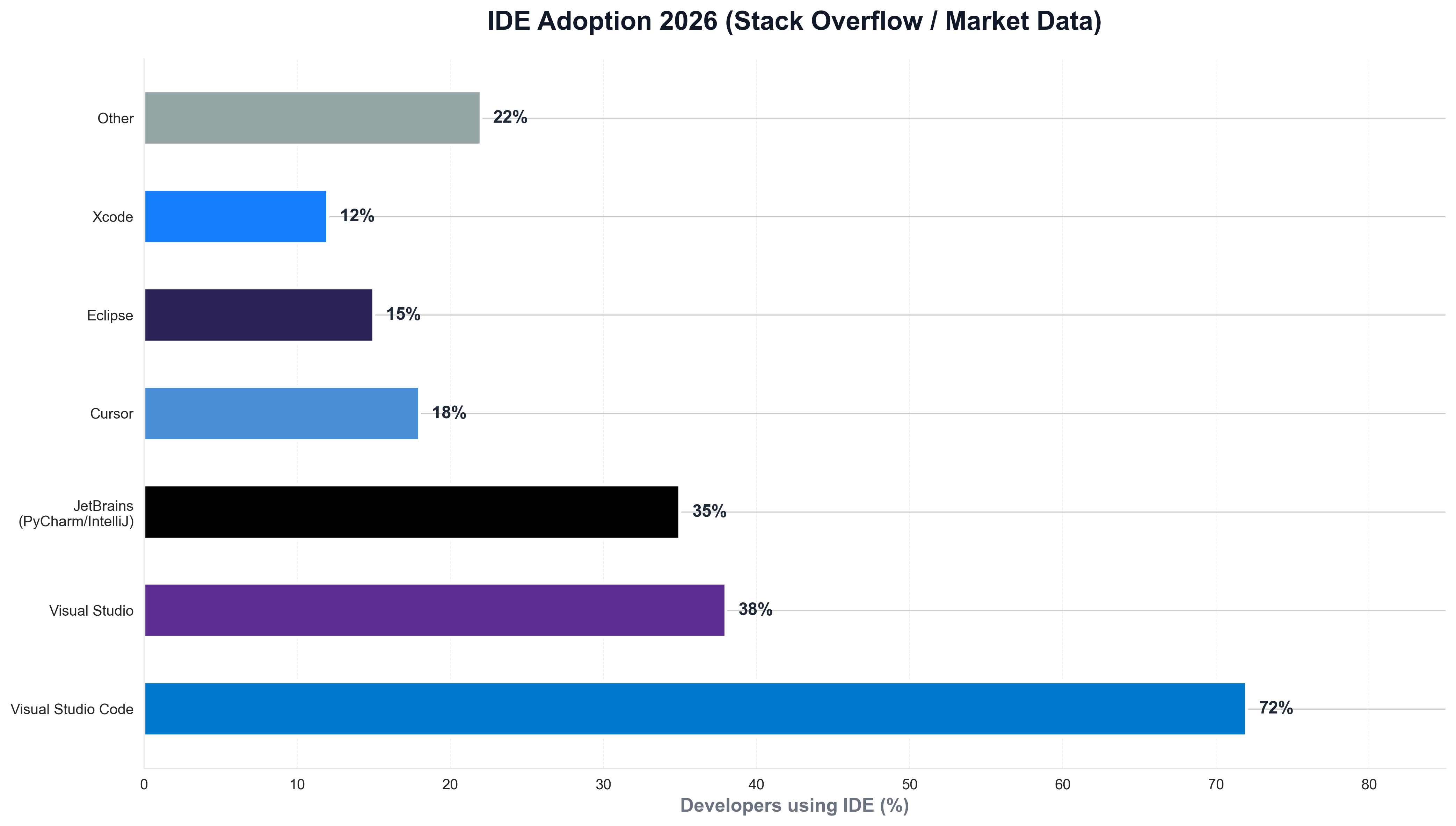
The chart above shows VS Code well ahead of other editors and full IDEs—reflecting its dominance among individual developers and teams. Python is the natural choice for building such visualizations: developer-relations and product teams routinely use Python scripts to load survey or usage data and produce publication-ready charts for reports and articles like this one.
201 Million Installs: The Python Extension and the Extension Ecosystem
The scale of VS Code's extension ecosystem is striking. The Visual Studio Code Python extension by Microsoft is the most downloaded Python tool in VS Code, with over 201 million installs. It provides IntelliSense (Pylance), debugging, linting, formatting, refactoring, and unit testing, and automatically installs complementary tools like Pylance and the Python Debugger. The Visual Studio Marketplace hosts thousands of extensions; Python, JavaScript, and TypeScript consistently rank among the top. When teams need to visualize extension adoption over time—installs by language or category—they often use Python and matplotlib or seaborn. The following chart, produced with Python, summarizes VS Code extension adoption (Python, JavaScript, and other top extensions) in a style consistent with marketplace and survey data.
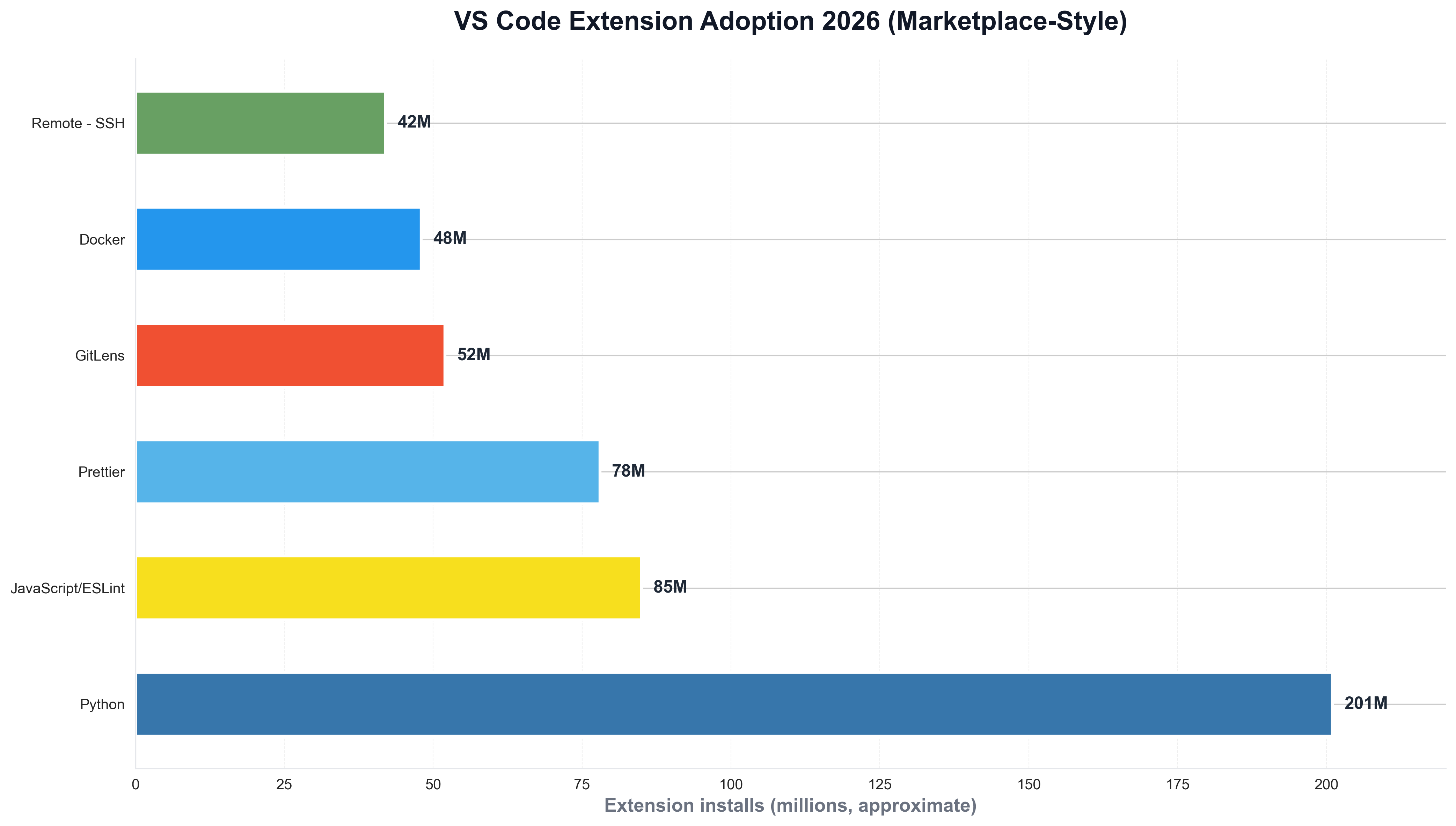
The chart illustrates Python as the leading language by extension installs—context that explains why VS Code is the default for Python developers and why Python is again the tool of choice for generating such charts from marketplace or internal data.
Why VS Code Won: Free, Cross-Platform, and Python-First
The business case for VS Code is free for everyone, cross-platform (Windows, macOS, Linux), and language-agnostic with best-in-class Python. Stack Overflow and JetBrains stress that developers choose VS Code for ease of setup, speed, and extensibility—no license cost, works out of the box for Python, JavaScript, TypeScript, and dozens of other languages via the marketplace. Python is a first-class citizen: the official Python extension, Pylance, Jupyter support, and debugging make VS Code the default for many Python developers. For teams that track IDE usage or extension installs over time, Python is often used to load marketplace or survey data and plot trends. A minimal example might look like the following: load a CSV of extension installs by month, and save a chart for internal or public reporting.
import pandas as pd
import matplotlib.pyplot as plt

df = pd.read_csv("vscode_extension_installs_by_month.csv")
fig, ax = plt.subplots(figsize=(10, 5))
ax.plot(df["month"], df["python_installs_millions"], marker="o", linewidth=2, color="#007acc")
ax.set_ylabel("Python extension installs (millions)")
ax.set_title("VS Code Python extension installs (marketplace-style)")
fig.savefig("public/images/blog/vs-code-python-installs-trend.png", dpi=150, bbox_inches="tight")
plt.close()
That kind of Python script is typical for developer relations and product teams: same language so many developers use in VS Code, and direct control over chart layout and messaging.
AI-Enabled IDEs: Cursor, Copilot, and the 2026 Editor Landscape
Stack Overflow's 2025 survey notes that usage is growing for new AI-enabled IDEs added in 2025, including Cursor. VS Code itself has GitHub Copilot and a growing set of AI extensions, so the line between "traditional" and "AI" editors is blurring. Infoworld's coverage of the survey reports that AI use among software developers grows but trust remains an issue—developers adopt AI-assisted coding while remaining cautious. In 2026, VS Code remains the base for many developers; Copilot, Cursor, and other AI layers sit on top of the editor and extension workflow. Python continues to be the language of choice for data science, automation, and tooling inside and outside the editor—and Python scripts are often used to analyze survey data and visualize IDE and AI adoption for reports like this one.
PyCharm, JetBrains, and the Multi-IDE Reality
Only a portion of developers use VS Code exclusively. The JetBrains State of Developer Ecosystem 2025 (24,534 developers) shows JetBrains IDEs (e.g. PyCharm for Python, IntelliJ for Java) favored by many professionals for refactoring, navigation, and framework support. Moldstud's guide notes PyCharm used by about 40% of Python professionals and IntelliJ by roughly 45–50% of Java developers for enterprise work. Multi-tool setups are common: developers may use VS Code for quick edits and scripting and PyCharm or Visual Studio for large projects. Python is the language many use to script builds, analyze repo metrics, and visualize tool adoption—so Python and VS Code together form a default stack for data and automation work.
Conclusion: VS Code as the Default in 2026
In 2026, Visual Studio Code is the default code editor for the majority of developers. Roughly 72% market share, 14+ million active monthly users, and 201+ million installs of the Python extension tell the story: VS Code won on price, speed, extensibility, and Python support. Stack Overflow's 2025 survey and JetBrains' ecosystem report confirm VS Code and Visual Studio at the top, with AI-enabled IDEs like Cursor gaining ground. Python remains the language that powers the extension (Python extension), the workflow (scripting, data, tooling), and the visualizations that explain adoption—so that for Google News and Google Discover, the story in 2026 is clear: VS Code is where most developers code, and Python is how many of them build and analyze the tools they use.